Configurable Output

Description

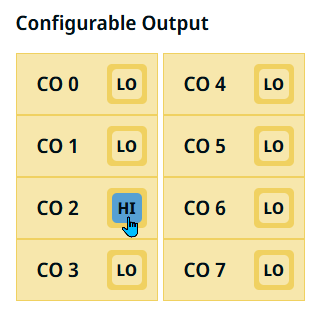
The Configurable Output field ranges from CO 0 to CO 7.


To access Configurable Output

  1. You can click the square button beside each CO to choose either LO or HI.

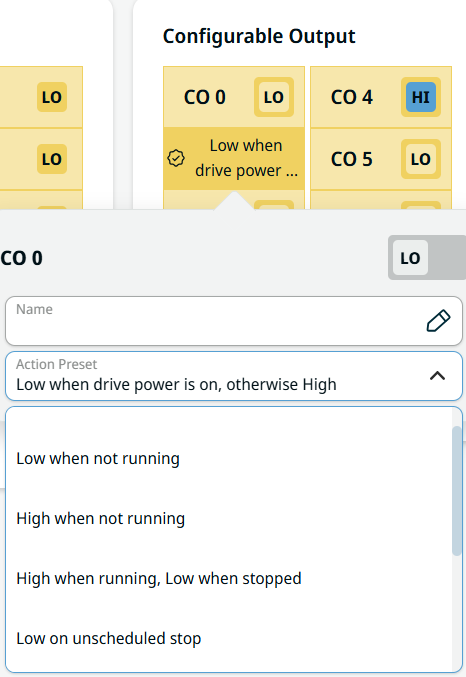
  2. Tap CO 0, and the Name and Action Preset fields appear.

  3. In the Name field, create a name and Confirm. The new name can now be seen in the communication screen.

 
  1. Tap the Action Preset field, and nine choices are available:

    • None

    • Low when not running. Output state is LO. Program state is stopped or paused.

    • High when not running. Output state is HI. Program state is stopped or paused.

    • High when running, Low when stopped. Output state is LO then HI. Program state is running, stopped, or paused.

    • Low on unscheduled stop. Output state is LO. Program state is terminated unscheduled.

    • Low on unscheduled stop, otherwise High. Output state is LO then HI. Program state is terminated unscheduled, running, stopped, or paused.

    • Continuous Pulse. Output state alternates from LO to HI. Program state is running.

    • High when drive power is on, otherwise Low.Output state is HI.

    • Low when drive power is on, otherwise High. Output state is LO.

  2. Choose the pertinent action preset.

    By selecting the last two action presets, the HI/LO value of signals will be changed when power is OFF/ON.